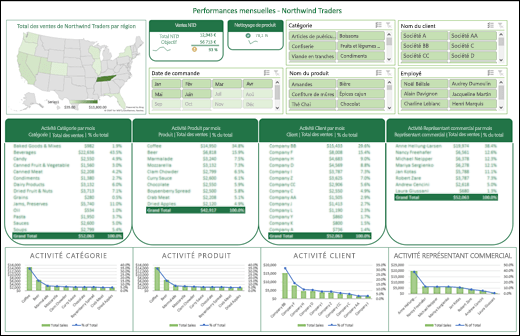
An Excel business management dashboard brings together the information needed to monitor a company, such as revenue, expenses, cash movements, sales activity, operations and projects. The main challenge is choosing useful indicators while keeping the underlying data easy to update.
Choose KPIs linked to business objectives
A business dashboard should not display every number available. Start with recurring management questions: Is activity changing? Which expenses require attention? Which invoices need follow-up? Which projects need intervention?
Depending on your business, indicators may include:
- revenue by period;
- expenses by category;
- cash received and paid;
- invoices requiring follow-up;
- sales opportunities;
- project progress;
- operational workload.
KPIs must match your data and organization. A metric that matters to an agency may be less relevant to a retailer or professional-services company.
Centralize data in a clean structure
The biggest difficulty is often not chart creation but data fragmentation. Information may be spread across Excel, Google Sheets, a CRM, accounting software, forms and operational applications.
In Excel, use stable columns, normalized dates and consistent categories. Separate raw data from calculation sheets and from the executive dashboard.
This architecture makes updates safer and allows new reporting periods to be added more easily.
Eprand provides reporting and automation services when manual transfers between tools become too time-consuming.
Build a readable management view
The main page should be understandable quickly. Place priority KPIs at the top and add a limited number of charts showing trends and differences.
A useful structure can have three levels:
- overall situation;
- change over time;
- items requiring action.
Avoid decorative charts. A line chart is useful for trends, a bar chart for comparisons and a filtered list for items that need attention.
Filters can also be added by period, activity, owner or client when those dimensions exist in the source data.
Reduce manual data entry
An Excel business management dashboard can become time-consuming if every value has to be copied manually. Where sources allow it, automate imports or standardize exports.
Power Query can import and transform compatible data sources. Tools such as n8n, Make and Zapier can also connect applications and trigger processing when the workflow is suitable.
Automation does not necessarily mean replacing Excel. The workbook can remain the reporting layer while receiving data that has already been collected or transformed.
Automate stable repetitive tasks first, and keep human validation for information that requires context.
Let reporting evolve with the business
Reporting requirements change over time. A well-structured dashboard should accept new indicators without forcing you to rebuild the whole workbook.
Keep basic documentation covering data sources, KPI definitions, update frequency and calculation rules. This makes the workbook easier to transfer and reduces different interpretations of the same metric.
The FAQ provides additional information about Eprand services and integrations.
Create your business dashboard with Eprand
Good Excel reporting should help you understand operations and identify actions without turning updates into a permanent administrative task. Clear structure, useful KPIs and controlled data flows are therefore the priorities.
To design or automate your dashboard, book a call for a free first discussion. You can also view pricing; Eprand charges €30 per hour.